Series Table of Contents
Part 0: Standard Abstraction Layers and Defining the Platform Part 1: Types and Process of Generalization Part 2: The Architecture of Your Platform Part 3: Designing Great Contracts First Part 4: Implement and Test Contracts Part 5: Continuous Integration Early Steps Part 6: Evolving the Platform Part 7: Dreaded Documentation Details Part 8: Distribution of the Platform
Introduction
In Part 0 of this series, "Building a Platform" we defined a platform and the layers of abstraction. We discussed the different layers and the importance of creating abstractions to ease the work required by application and system developers.
Part 1, "Process of Generalization" we introduced the process of creating generalizations, and thus, abstractions for your software.
Part 2, "The Architecture of Your Platform" we will introduce getting started by laying some groundwork for your future. I will provide my personal guidance, but ultimately, it will be the consistency that matters.
Definitions
Below are the definitions, as it pertains to building a platform. Remember words matter in context. Some of these may mean something else in other contextual environments.
(Software) Architecture
Architecture represents the significant design decisions that shape a system, where significant is measured by cost of change.
- Grady Booch
Or put another way,
Architecture is the decisions that you wish you could get right early in a project, but that you are not necessarily more likely to get them right than any other.
- Ralph Johnson
And lastly,
Architecture is a hypothesis, that needs to be proven by implementation and measurement.
- Tom Gilb
Architecture can be hard to define. Each of these provides a unique perspective on how architecture can be defined. What's important to understand about these quotes is that they're all true. To Summarize, Good Architecture
- Is the significant design decisions with a high cost of change.
- Are the decisions that are hard to get right early on.
- Is proven through implementation and measurement (i.e. using it)
To build a successful platform, whether it be a business platform, a SaaS product platform, or even a platform as a service, the architecture must remain strong; something that will allow the platform to evolve.
This article is about helping you define your platform's architecture. It is not about defining all the various "architecture" paradigms out in the ether. However, to be successful, it is wise to have studied architecture thoroughly. For instance, a great book on architecture is Clean Architecture by Robert C. Martin. If you're not a book person, there are thousands of articles going through the basics of these paradigms.
We will be using concrete examples and positions that you can take when building up the platform.
Module
A module, as defined here is,
An assembly, or group of assemblies, that form a significant level of functionality, usually built on a core framework, or the platform itself.
Some good examples of "modules" could be things like
- Dependency Injection in (.NET Core)
- Configuration and Options (.NET Core)
- Asset Tracking (when within an Inventory Platform)
- Assembly Building (when within an Inventory Platform)
- Hardware Integration Management (when within a Kiosk Platform)
Module separation is critical to the foundation of any platform. Every piece of code within a platform should belong to a module (even if it is a "Core" module). Modules should be isolated from each other to the degree they are not required to inter-operate between other modules or hold dependencies.
Working with other modules in an integrated fashion is allowed, and in fact encouraged. But this is typically implemented as classes implementing the calling module's interfaces.
Distributables (Assemblies / Class Libraries)
A Distributable is any grouping of classes, or class files, that form a logical grouping and are distributed together.
In the .NET world, a distributable is an assembly or class library. In Java it is a Java Class Library (JCL). In JavaScript it may be an NPM package (but not always). In C++, it might be object files or DLLs. It is anything that can be distributed as a group and is usually grouped into a single package.
These distributables also act as high-level dependency sources. We start to define stable and unstable dependencies at the distributable level. For instance, if a class library has no dependencies but is depended upon by many other class libraries, it is considered stable. While the inverse is true; a class library that is dependent on many assemblies but is top-level, is considered unstable.
Namespaces
Namespaces are unique scopes, or paths, to symbols within a codebase, often used to prevent clashes.
Namespaces are entirely for the benefit of the developer. It is really a means to find code and organize code files logically, rather than physically. They become important when discussing usability of a system.
I won't offer advice here on namespaces. I wanted to at least make note of their purpose.
Abstractions
A mapping, or representation, of a problem onto a new representation. A compression process where the mapping is based on similarities in constituent data.
Abstractions, for the purposes of a platform, will be considered a code contract that is met by concretions. These contracts are the referenced dependencies of any higher-level layers.
For instance, all of these are abstractions,
- (C#/Java) Interfaces
- (C#/Java/C++) Abstract Classes
- (Haskell) Type Classes
- (TypeScript) Type
These are fairly obvious, but for the sake of this article, abstractions are actual elements of the code that we will build from. It will commonly be referred to as "interfaces" throughout the series.
Code Contracts
Code Contracts are formal, or informal, agreements between two entities in a software system, or external actors.
This is generic on purpose. For instance, abstractions are themselves contracts. However, so are RESTful schemas (OpenAPI). There are many different types of contracts. In fact, too many to name here. However here are a few examples,
public interfaceorpublic abstract class- Internet Contracts can include the protocol (TCP/UDP), Packet Format, Response Definitions, etc.
- API Contracts which can include, scheme (HTTP/HTTPS/FTP), Architectural Pattern (SOAP/REST/gRPC), Request Schema, Response Schema, Error Codes, etc.
- Exception Contracts that agree with all callers of a system, class, or method about what exceptions can be thrown and possible messages.
- Pre-Condition and Post-Condition Contracts provide assurances of input/output expectations.
- SLA Contracts that provide response times and agreements with end-users.
- Performance Contracts provide an agreement on metrics in the system.
Contracts can be about anything within a system. We're talking about agreements, which put a different way, is about requirements. A requirement is an agreement (or contract) that we make with the business to fulfill within the software. We must adhere to the contract; else the success of the product may fail.
Maintaining contract compliance, at any level, is the most critical aspect to building a platform, and software in general. We create architectures, build automated testing, and solution systems around our ability to fulfill contracts.
There are more contracts between yourself, typically, than with the outside world. Sometimes we just don't recognize it. When we add a null check, we're creating a contract. Or when we intuitively know we'll only ever return positive integers, we're creating a contract. The question is whether we document this, either through automated testing or explicit documentation.
Implementations
Implementations are defined as one or more fulfilled abstractions, or more generally contracts, within a code system.
We know implementations as classes, functions, or data. In this series, when we talk about implementations, we will be referring to an implemented interface, in most cases. However, it may mean any contract that must be fulfilled, through the use of modules, libraries, classes, or functions.
Determining your Architecture Rules
It may be important to start off by saying that there are NO hard and fast rules about which architecture is right or wrong or even when certain ones should and shouldn't be used. However, I can say that I am a strong opponent to the "layered-architecture." Of all the architectures, this is the one that is most misunderstood, and the one I find folks implement in the most annoying of ways.
Clarification, I'm not actually against the Layered Architecture, just how I've seen it implemented incorrectly time and time again. It actually serves a good purpose in some scenarios.
Layered Architecture
The following diagram is probably my biggest pet-peeve that I see from developers young and old. If you're a new developer (under 5 years of experience), then I understand why you may do this. I used to do this. But if you've been programming for 10+ years, I will really struggle to listen if you tell me this is the "correct" way to form an architecture, or even try to convince me somehow there is actually a use-case for this being correct.
Let's take a look.
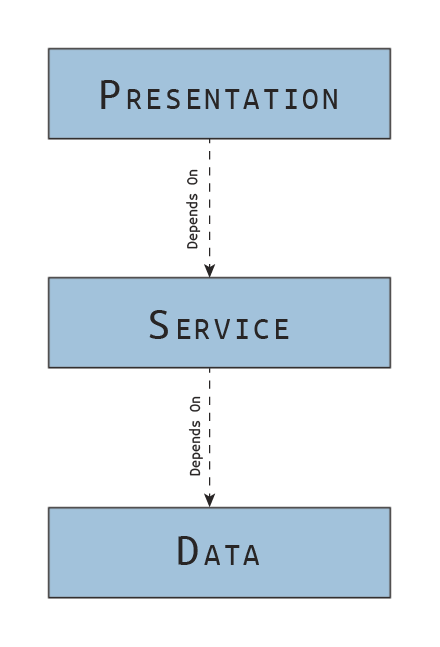 Incorrect Layered Architecture Dependencies
How this usually shows up in a .NET Application is something like this:
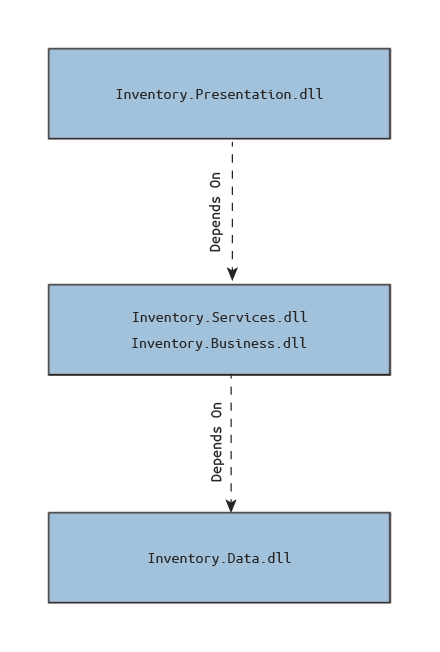 Assembly References with this Architecture
You'll see some web project or WPF project that references a "Services" DLL, and that assembly will in turn reference a "Data" DLL of some kind. Now, the tell-tale sign of bad design is when the "Data" DLL has its own interfaces and models related to data, and the "Services" (or Business) DLL has its own set of interfaces and models that map to the "Data" DLL's interfaces and models (publicly). This here is the fallacy.
The correct way to approach this is to invert the "Data" relationship like so,
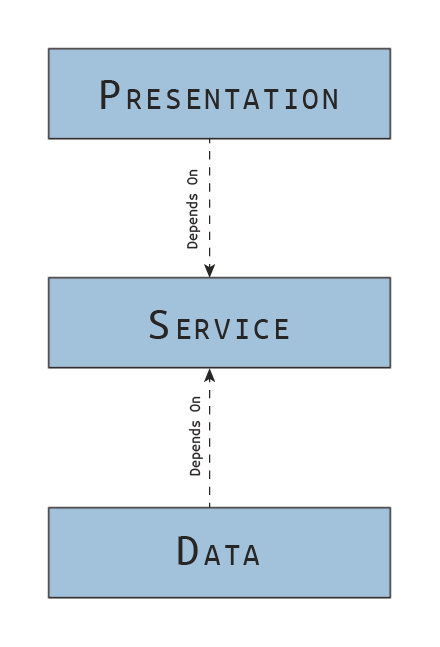 Correct Way
Now, you have the relationship inverted for the "Data" portion. Instead of mapping from "Service" to "Data" directly, you encapsulate this by having the "Data" layer implement the "Service" (or Business) interfaces itself. How it fulfills this contract, is up to you to decide. But there shouldn't be any reference in "Services" to a "Data" DLL at all.
This is the correct way to do a Layered Architecture and I fully support this.
Please do not confuse 3-Tiered with 3-Layered. These are different.
Which Pattern do I Choose Then?
With that little rant out of the way (sorry folks, I'm passionate about that one), I should make another mention about architectural patterns. I don't really agree with any of them fully. They're inherently models that help guide us, but they are more like general guidelines to follow.
I don't necessarily see architecture as layered, or "clean", or shaped like an onion, or only microservices, or any of the multitude of others. Each of these have great aspects to them. Some are simple to understand, and some provide a clear picture. I think the best way for me to describe my architectural "pattern" is to see things as a graph of modules.
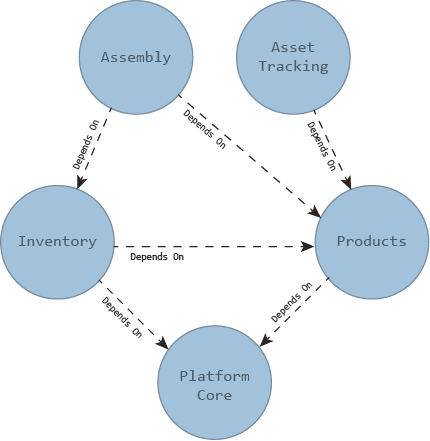 Module Architecture
Each module could be one or more assemblies or class libraries. In general, I'll let a module determine its internal architecture however it needs. But at this module level, we focus on top-down (unstable to stable) dependency graphs. Stable dependencies, modules that do not change often and are depended upon by a lot of other modules, should be towards the bottom of the graph. Unstable dependencies, modules that change very often but have minimal other modules that are dependent on it, should linger towards the top.
This is very similar (if not precisely) to what Clean Architecture proposes. However, I'm not a fan, personally, of the circular graph. This gives me better clarity on the actual form of dependencies when mapping it out.
To speak more on module architecture itself, I will very much use the layered architecture within a particular module. I may even use microservices in some cases. But I let the module determine that.
We should define an architectural pattern at each conceptual level of our platform! But not more than one!
Here are the levels of architecture in which we should be aware, where the highest level is at the top of the list.
- Presentation (UI / API) — Group of Modules
- Module — Group of Distributables
- Distributable — Group of Abstractions and Implementations
- Abstractions and Implementations — Functions and Data
When determining the architecture of our platform, we should take heed of each of these levels and have a strategy in place for each, so we have consistency.
Sample Architecture of a Platform
I think it will be important to understand each level and form a mental model describing your architecture. Architecture is hard to change, and the following decisions, although best practices, help form a basis for a team working on a platform to make the best decisions.
We will walk through the general organization, then move into organizing levels. I will speak to this from the perspective of .NET Core. Each framework and tool have different advantages and disadvantages. Some of these suggestions may not apply directly to your toolchain or methodology. And that's ok. But I will try to explain my reasoning as best I can, so you can make informed decisions.
Source Code Organization (Repositories)
Regardless of the source control repository technology your team uses (GIT, Mercurial, SVN, etc) you can organize your platform in two ways:
- Separate Repositories (Polyrepo) broken up by Module (or some logical grouping)
- Mono Repository (Monorepo) containing all platform related code (including modules)
Neither choice is wrong, however, I will state that I strongly prefer Monorepos. Let's describe the differences and their Pros/Cons.
Separate Repositories (Polyrepos)
This is where you break up repositories by team, module, or any other logical grouping. It doesn't matter how it is broken up, the premise is that if you need to build the full platform, or deploy it, you will need to take into account multiple different repositories.
Advantages
- Isolates teams in a way to control changes to a codebase through security measures.
- Allows for different modules and teams to work with different special processes without affecting all teams (think sensitive code)
- Easier tracking of changes and commits due to less of them occurring in comparison to multi-team monorepos.
- Faster decisions can be made with respect to testing, building, and deployments since a smaller team have to agree on these decisions.
- Quality control is easier at the localized module level.
- Smaller code bases mean smaller download times.
Disadvantages
- Sub-Trees or Sub-Modules required to be referenced directly requires a more complex setup which can be confusing from a committed perspective.
- Difficult to coordinate builds and deployments with proper version tracking without added infrastructure (i.e. NPM packages, NuGet packages, etc).
- Dependency alterations and the propagation to dependent modules can lag behind significantly. Also suffers from difficult commit referencing across modules.
- Additional processes and controls must be in place to handle multiple teams coordinating releases and versions.
- Less flexible resource sharing: Teams become more isolated and cannot easily work code together.
Single Repository (Monorepo)
This is where you pull all platform-related code into a single repository and teams share the code and processes. For this to work, however, it is important that strict structure and discipline are enforced. Having different folder structures and standards would inevitably cause chaos.
Advantages
- All required code is in one spot allowing for shared references and dependencies without the extra process bloat of creating packages
- Resources can be shared, as necessary, providing flexibility when features are required. Teams can bend when features span multiple modules by sharing branches, or other mechanisms.
- With proper discipline, changes can be automatically built and tested with less effort, as all code will be localized. Meaning, when a change is committed by anyone, you can determine more readily if it breaks other modules.
Disadvantages
- All teams must work under the same structure. This makes changing process and procedures very difficult.
- Change history can become bloated quickly and searching for commits is difficult. A process around tagging and squash commits becomes important.
- Limits the ability to isolate sensitive code. (Would require separate repositories still)
- Permissions between teams and what is allowed to be changed are limited, if non-existent
- More code means longer download times for builds.
Verdict
For me, I'm probably biased towards monorepos. The advantage of choosing a monorepo is the collaboration. This can be utterly critical for a platform. Platforms are meant to be unified in nature and the best way to do that is to have everyone in the same place.
However, to succeed, requires a mature software development organization with the discipline to follow very specific rules, processes, and procedures. This can be difficult in younger organizations.
Since I am offering up my opinion of a monorepo, let's consider a file structure for a monorepo.
See the repository dotnet/runtime. They act like a monorepo in their structure, and they follow something very similar to mine (or maybe it's the other way around).
Proposed Monorepo Structure
 Monorepo Structure (Collapsed)
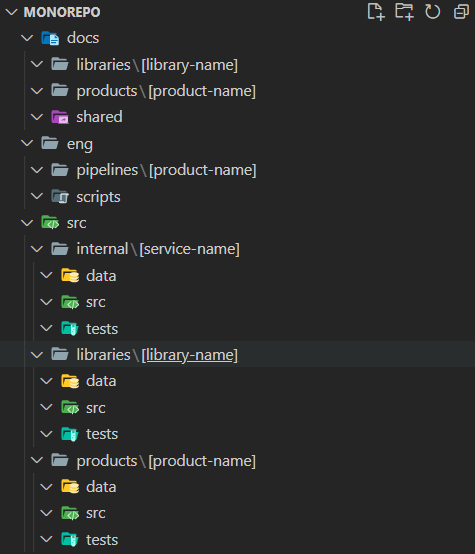 Monorepo Structure (Expanded)
There are 3 primary directories at the root:
docs/: Holds all documentation related to libraries, products, and general documentationeng/: Holds all details related to engineering including scripts, build, and release pipelinessrc/: Holds the source code of the platform
The src the folder is further broken down into sub-folders:
internal/: Holds internal code, like CLI utilities for the team, Test Applications, etc.libraries/: Holds shared libraries for the platform team which could include cross-cutting distributables for logging, security, etc. It can also hold module specific client libraries to be used by other teams. This is a flat list of librariesproducts/: Holds the module / product-specific source for a team. All interfaces, libraries, tests, and data definitions are held here.
Once inside a specific product or library, there are 3 main sub-directories:
src/: Holds the primary source codetests/: Holds all test-related code for the given product or librarydata/: Holds any data definitions for the product, like database projects, schemas, OpenAPI, etc.
Now this structure may or may not work for your team. It does really depend on how your team is structured. But I have found this works fairly well for larger scale platforms.
Distributables (Assemblies / Class Libraries)
Once we have our core structure determined, how do we organize each module? Each module's assembly can have any number of dependencies amongst others in the module. How should we name these assemblies?
Here are some guidelines:
- Logically group abstractions into a single assembly. Include any models required by the abstractions, but do NOT include implementations.
Example:
Sparcpoint.Inventory.AbstractionsorSparcpoint.Inventory.Assemblies.Abstractions - Abstraction assemblies should not reference any other assemblies in the module.
- When specific implementations may be using specific technologies, separate out these technologies into their own assemblies.
Example:
Sparcpoint.Inventory.SqlServerorSparcpoint.Inventory.MongoDBorSparcpoint.Inventory.AzureStorage - Implementation assemblies should generally only reference abstraction and core assemblies (although extensions may be needed as well)
- To avoid changing code used by multiple teams, when new functionality can be contained into a single assembly, of reasonable size, that augments current functionality, and can be sufficiently isolated, create an extensions assembly.
Example:
Sparcpoint.Inventory.Extensions.ModelingorSparcpoint.Tracing.Extensions.Logging - Appropriately name all projects and assemblies that represent external presentations or interfaces (CLI Tools, Web, APIs, etc)
Example:
Sparcpoint.Inventory.WeborSparcpoint.Tracer.CommandLineorSparcoint.Workflow.WebAPI - With the exception of testing assemblies, no other module assemblies should reference external presentation or interface assemblies.
- When providing functionality to other teams, create client assemblies for their use. If there are different specific needs between teams, consider creating separate assemblies for each of them according to functionality.
Example:
Sparcpoint.Inventory.ClientorSparcpoint.Tracer.ClientorSparcpoint.Inventory.Reporting.Client(Team is Reporting) - Business service implementations (not specific to a technology) and models, that are not a part of the abstraction assembly, should be brought into a core assembly. This assembly will be a shared assembly. Be careful that this doesn't become a dumping ground.
Example:
Sparcpoint.Inventory.CoreorSparcoint.Tracer.Core - If needing any helper classes to configure services within a specific project type, I would create a separate assembly just for this, to prevent leakage of details into the core assembly. For instance, let's say I want to create some helpers for
IServiceCollectionor middleware for inventory services, I would create a specific ASP.NET Core assembly. Many times, this assembly acts as a dependency root. Example:Sparcpoint.Inventory.AspNetCore
These are just some guidelines that can be used when grouping code together into different assemblies within a module. This helps to encourage encapsulation.
You could find yourself creating a lot of small assemblies. But that's ok. It helps enforce dependency structure by properly putting classes where they belong. It may require a bit of discipline. But these libraries can be re-used as well, with the proper management.
By re-use I mean different presentation interfaces (CLI, Web, etc) if done well. It is also easier to manage smaller assemblies than massive ones, even with the best of organization.
Abstractions and Implementations
Abstractions and Implementations should almost never be in the same assemblies. This isn't a hard and fast rule, but keeping this separation, you can help control the overall architecture.
For instance, you should keep all inventory abstractions and related models in an assembly called Sparcpoint.Inventory.Abstractions. This assembly will hold code like the following
- Services:
IInstanceRepository<T> - Base Models:
public abstract class Instance { } - Concrete Models:
public sealed class ProductInstance : Instance { }
If an abstraction requires a model, it should be here. There are some extension methods that may make sense here, but generally any extension methods I would place within an assembly like Sparcpoint.Extensions.Inventory. If an extension is specific to a feature set, it may be in an assembly called, Sparcpoint.Extensions.Inventory.AssetTracking. I do this because it isn't core functionality, otherwise it would be on the abstractions. We're augmenting it.
Any implementations that are technology-specific, would be pushed into specific assemblies associated to their type:
- SQL Server:
Sparcpoint.Inventory.SqlServer - Azure Blob Storage:
Sparcpoint.Inventory.AzureStorage - ElasticSearch (ELK):
Sparcpoint.Inventory.ElasticSearch
For example, some classes you might find in the SQL Server implementation assembly:
- Repository Implementation:
public class SqlServerProductInstanceRepository : IInstanceRepository<ProductInstance> { } - Internal DTOs:
internal class ProductInstanceDto { } - Internal Abstractions:
internal interface ISqlExecutor { } - Internal Implementations:
internal class SqlExecutor : ISqlExecutor
Usually, I will attempt to only make public the abstractions and implementations that are either required by the dependency root or being implemented by the abstraction's assembly.
The single responsibility principle can just as easily be applied to assemblies as it can with classes. It just works at a higher level. Like mentioned before, we may have a SQL Server Implementation assembly, but we may not want to reference .NET Core libraries directly (instead we want .NET Standard 2.1). I would create a separate assembly
Sparcpoint.Inventory.AspNetCorethat would referenceSparcpoint.Inventory.AbstractionsandSparcpoint.Inventory.SqlServerand create theIServiceCollectionextensions inside it. Subsequently thisAspNetCoreassembly would be referenced by the presentation projects.
Functions and Data
At this final level (lowest), we are really just dealing with functions and data. With any architecture, we should create rules and guidelines around best practices. Here are a few, but most can be found elsewhere:
- Attempt to make as many services as possible work without state. This allows for DI to create a single instance saving on memory. It also makes debugging much easier without having to worry about race conditions.
- Inject abstractions almost entirely (Depend on abstractions not concretions).
- Keep interfaces as small as possible. This provides flexibility when cross-cutting concerns arise.
- Any models that are being used as data transfer objects (DTOs) for JSON serialization, database transfer, or specialized services should be internal to the assembly. Attempt to only rely on public models and avoid mapping logic where possible.
- Use Request objects for repositories and interfaces over separate parameters. They can be treated like overloads by making some properties optional. If quality-of-life improvements are needed, use extension methods (or your language equivalent).
- Use Response objects for any return types with more than one datum.
- When the language supports it, use async/await. Generally, saves on performance.
- Avoid public functions on implementations when not defined on the abstraction. Instead use internal scope when required by other classes within the assembly.
- (Obvious) Keep methods reasonably small, less than 80 lines (at most).
There are a hundred more guidelines you can put in place, but this is a start.
Other Considerations
Here are a few other miscellaneous guidelines to follow:
- Rules are meant to be broken. Use proper judgement and test your ideas before committing. Experimentation breeds innovation.
- Don't test private methods directly. If you find a need to test private methods, there is usually an issue with the architecture. Instead, when determining your testing strategy, focus on public methods only.
- Ensure refactoring of tests is understood. I didn't include much on testing here (as we'll talk about this in more detail in a future article), but tests should be refactored. Multiple test assemblies may be able to share common code. Consider how you want the team to manage these assemblies early on.
- Mixing project types may cause issues with certain developers. Consider altering your monorepo structure to accommodate. For instance, a .NET Solution doesn't work well in the same directory as a Vue.js project.
- Document your Architecture. There are a million and one ways to document architecture. Figure out what is best for you and the team and put it in your
docs/folder, so folks understand the expectations.
Conclusion and Sign-Off
Architecture is a large topic. This is just a starting place. Be flexible and focus on your core principles as you begin the journey. I hope that this article has helped provide some solid examples and you gleaned at least one useful technique.
If you have any thoughts or suggestions, please comment below. And be sure to follow me on medium, as I release new topics all the time!
Until next time!