Techniques I utilize to provide a vision for building software at an architectural level

Designing software is difficult. Not only is it difficult, but it is impossible to design software "right." I mean that software can be written in infinite ways to achieve the same outcome. Everything from the user interface (UI) to the variable names in a function can change to accomplish a single business need. So, during the software design phase, if you have one at all, many decisions are made.
But what kind of decisions? How many assumptions are you bringing into the design? How flexible is the design to change? Will the developer understand the design and have the capacity to build it?
These questions are abstract enough to make the design difficult. I cannot solve the difficulty, but I can help bring clarity to a process that tends to work for the teams I surround myself with, breaking it down into manageable parts.
I want to present some of my personal guidelines and techniques (plus tools) for designing software systems, especially more complex ones.
The Basics of Software Design
What are we trying to accomplish when we piece together a software design?
All we are trying to do is communicate the software system's vision, boundaries, and contracts according to the business need, which is defined as "Any functional set of requirements to achieve a profitable outcome either financially, socially, or to gain efficiency."
Let's break down these terms a bit more.
Vision
Definition: The imagined gain and intent accompanying a business need with regard to its stakeholders.
When we say vision, we are trying to provide the listener with a sense of emotion toward the outcome of the given business need. Why are we even trying to build this product or function?
We're not trying to describe the product or feature itself, but we're trying to create a shared goal with ownership by stakeholders in the process. In this way, all individuals involved move in the same direction understanding the "spiritual" essence of the outcome, not the literal outcome necessarily.
For example, your CTO has decided that the organization needs a platform. That statement, by itself, means nothing. However, if they add that the platform will bring efficiency, a shared approach to quality, and lower the cost of development, you can see the "intent" of this outcome. Now, regardless of how we get there, the qualities of this "vision" are to achieve these three items. Yes, it will be a "platform," but the final outcome is arbitrary if we meet those qualities.
Boundary
Definition: The constraints of the process, output, or support to which it must adhere to be acceptable as a final output.
Boundaries are created to develop efficiency during a design process. They are intended to draw lines around all aspects of the design process to prevent unwanted side effects upon product completion. But other times, they are to prevent ambiguity while developing the software.
A good way to imagine why boundaries are helpful, let's imagine we have a simple algebraic equation,
Can you tell me what x equals from this equation? Well, of course not. We need to know what a, b, and c equal to figure this out. But as an architect, you might start by solving the equation for x without knowing the values themselves. You know there will be boundaries in the system, but they are currently unknown. So, you come up with this equation,
Now, you could pass this off to your "developer," but they'll be making some assumptions about the values of a, b, and c. Sometimes, these values may be arbitrary, but very rarely. So instead, we give them the boundaries,
Then our developers only have two choices at this point,
They still have some choices, but we have created boundaries for them. I use this analogy because it is easy to understand. However, real-life boundaries are more like the following:
- Must use X Framework
- Must use X Language
- The performance of function must be less than N mS.
Boundaries are requirements. There isn't any other way to define it beyond the requirements document you receive and interpret.
Remember, however, that requirements are not design documents. They are just the boundaries of your final output.
Contract
Definition: The constraints, or conventions, imposed on two or more systems, modules, or aspects of a hosting system, typically in relation to communication.
Contracts are, arguably, the most important aspect of any design. Even if you ignore vision and boundaries, contracts will ensure that the interaction between users and your system operate as expected. Maybe performance and other qualities of the software suffer due to the lack of boundaries, but it will be functional. However, you will typically only be able to create contracts with boundaries and a vision. Those are typically prerequisites to this aspect of design.
Contracts can take many forms, but typically we can group them into high-level categories that describe the need at each level:
- User Contracts: How will the user interact with the system? Console or web? How must the experience be tailored for the user?
- Integration Contracts: How does this system interact with other systems or applications? Through web services? Maybe through UDP sockets? Maybe through other channels like files? What are the inherent expectations of these other systems on timing and performance?
- API Contracts: Building a library that other developers will use? What is the process the developer will use to interact with your library? What are the parameters of the functions and modules? Are there limitations of the API?
- Data Contracts: What are the data models for the system? How is the data passed between services? How is the data stored in the database or on disk? Are there limitations in the length of fields or formatting restrictions?
- Team Contracts: How does your team operate? Do you work in a monorepo structure? Are automated tests (unit/integration, etc.) required for change submissions? Are code files organized in a particular way or by convention? Are there coding standards you must follow?
This list isn't exhaustive. There are a lot of less frequently used contracts within software design, but these hit the big five. If all of these are fully designed ahead of time, the "assembly developer" will make a few choices during the process. They would simply be putting the pieces together.
Now, if you're like me, you probably don't want all of this defined fully, at least not by someone else. However, there are those developers, usually more junior, that I would call the "assembly developer." They like cranking out the code and piecing the parts together. For those, this is extremely helpful.
Limits of Software Design
You could design a system with all of the above, then move into code-level design of interfaces (abstract classes), implementations (classes), and functional algorithms. When the system is built, it will be built exact. However, if you do this, you could build the software yourself, with the amount of time it would take to do this work.
With that said, putting some effort into the interfaces of a system is important. But there is an inherent issue with doing too much of this upfront.
If you attempt to design at the code level before understanding the final implementation, you will find yourself putting abstractions together that will change often. For abstractions to be successful, you must understand the full set of concrete implementations.
Sometimes, you might get lucky, but it is rare. That is why we version software. It changes often. It is "soft" for a reason. It is also why hardware is much more expensive (upfront) to design and build. But with hardware, it's necessary. I also believe that hardware design is a much more mature discipline (A story for another post).
For this reason, I stick with the high-level design of the system, with a large focus on contracts. This gives the developer internal freedom and expression at the code level while ensuring we achieve the desired results.
All that said, each use case is different. For instance, business web applications require UI design, web contracts, and data schemas to be successful, while open-source libraries require API contracts more than data contracts.
It is situational.
Regardless, contracts are the limit I typically take design when I am not a programmer.
Process of Design
I have seen two major approaches to designing software. Here's what they are:
- Top-Down Design: The designer starts at the user and works down through the system until the last layer, usually data, is designed.
- Bottom-Up Design: The designer starts with the data required, then moves up through the system until the user layer is hit last.
There is a notion of a "Hybrid Approach" where you tackle the Top and Bottom and move inwards from both ends, but I find this highly impractical and inefficient from a cognitive load standpoint. For this reason, I rarely include it in the list of approaches.
My preferred approach is the Top-Down Design approach. Most requirements are based on business needs or the user of your system. This means that it should remain correct if you get the top layer functional, based on boundaries and contracts, as you move down the stack.
If you prefer to design your data models first, I find this can cause some confusion as you move through the process. Effectively, your requirements are at the user level, so if you start at the bottom, you must skip all those layers in between, making some assumptions along the way without fully understanding the need upfront.
Can this be done successfully? Sure. But it takes a lot of intuition to do it well, and typically only the most experienced developers can do it well the first time. For the rest of us, we will iterate on that data multiple times before coming to a final model. And worse, you will have to change all layers in between until it is perfectly right.
I'm not one for rework, so I minimize this by focusing on the top first and working with the stakeholders to ensure that the top level is correctly meeting the needs. Once that is complete, and the vast majority of requirements are discovered, can I move down the stack.
Here is the generalized design process I utilize:
- Gather requirements from the appropriate stakeholders
- Mock-up and design the user interface for the target audiences
- Refine the requirements and iterate on the UI until an agreement is reached.
- Design contracts between the UI and all required backend systems and applications.
- Design contracts between the backend systems and other systems where communication occurs on the backend.
- Design data contracts utilized between the various systems and their storage engines.
- Design any complex queries for the data model required for the system's operation (anything beyond CRUD typically). This is done because the data model is designed with the specific queries required by nature.
At this point, I would typically stop. Occasionally, other needs crop up. For instance, there may be background processes that are timer triggered outside of the typical contracts that need to be defined. However, these are case-by-case situations.
Remember, we're just trying to give the developers a clear vision, boundaries, and contracts to work with to be successful. So, whatever is required to provide clarity should be included in the design.
Tools of Design
The following are the current tools I like to use when designing systems. Of course, I suspect you will have your own methods, but hopefully, you can see the types of tools utilized. I will work on other articles to better understand why I do things a specific way.
General (Wiki.js)
The high-level tool I like to use is Wiki.js. It is an open source wiki system that integrates with many great diagramming tools while allowing for standard markdown documentation. Some of the tools it provides include the following:
- Katex: Typesetting library and rendering engine
- Kroki: Consolidated diagramming tool
- PlantUML: Consolidated diagramming tool
- Diagram.net (draw.io): Integrated Visio-esque general diagramming tool
All designs I currently perform are through Wiki.js.
Vision (Wiki.js)
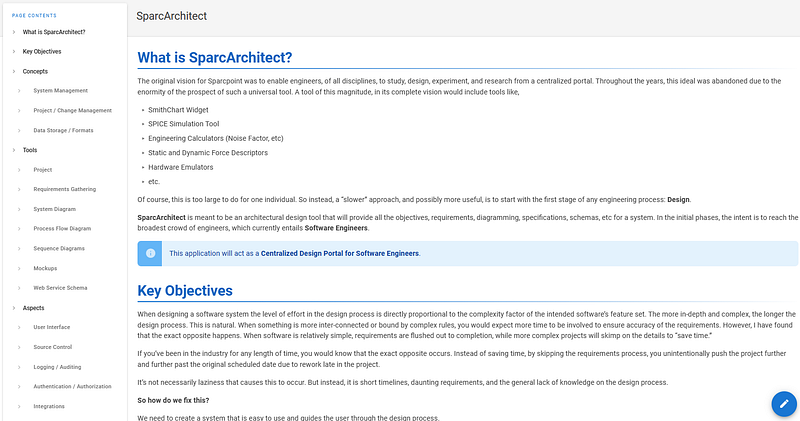
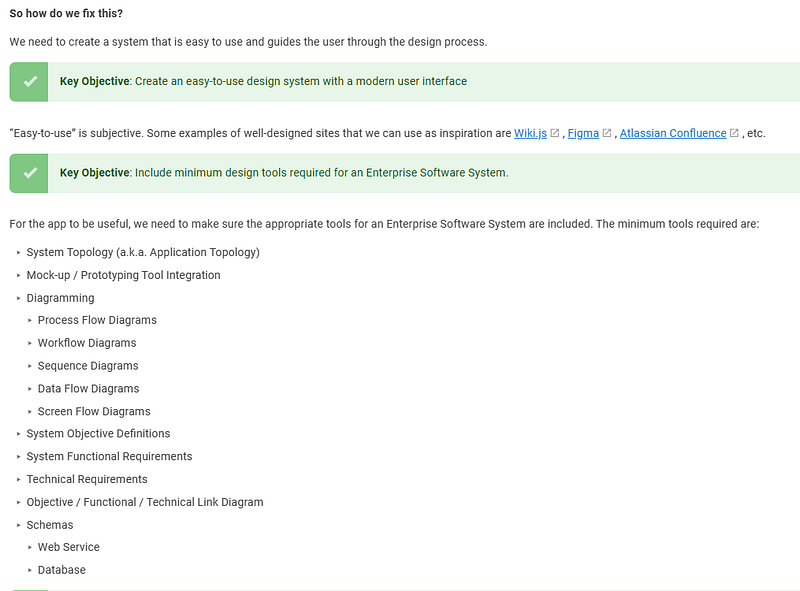
For the vision, I created a homepage within the wiki with an overview, system topology, and breakdown of how the system would operate. It tends to include all relevant links to the design.
 Screenshot by the author
 Screenshot by the author
You can see that I have this homepage broken down by what the objectives, tools, and aspects of the system include. This is a fairly large project, so I wouldn't expect most to be this involved. However, it gives you an idea of how I might put together some documentation on vision.
User interface — mockups (Balsamiq)
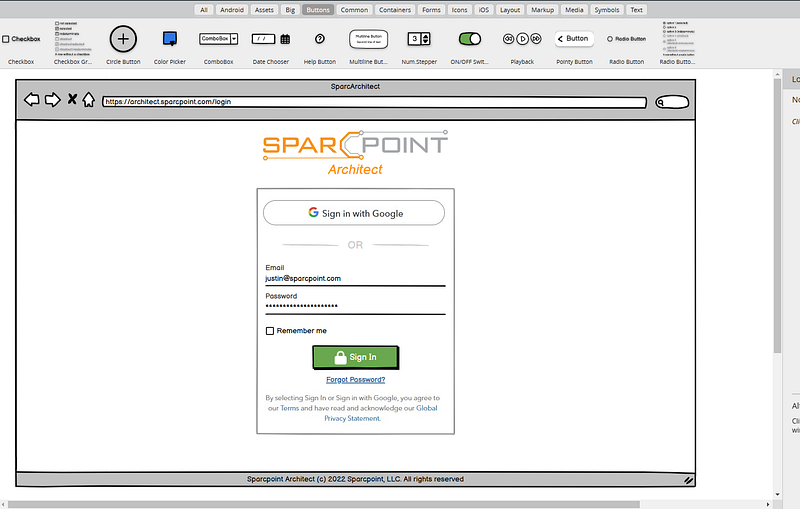
If I am developing an interface from scratch, I usually start with a mocking framework like Balsamiq.
 Screenshot by the Author
Generally, I aim to put the big components in place to ensure that the needs are met by the system overall. But I don't go into too much depth. Balsamiq isn't meant for the details like color, typography, images, and animation. It is for rough sketches. And this is what I will use it for initially. I get through this design quickly and may not even do every page. I may only do the high-level of the important pages to get the ideas out of my head.
User interface — prototypes (Adobe XD)
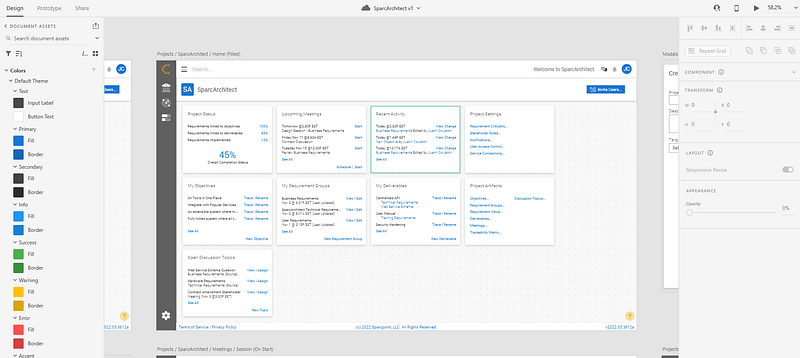
When polishing the development design, I will utilize Adobe XD. I use it mainly because I am used to it at this point, and it is still free. However, I have worked in Figma, and it is just as good, if not better. However, I'm not a UX designer by trade, so efficiency is more important to me in the immediate term. I have stuck with XD.
 Screenshot by the Author
At this point, I am working out the padding, margins, layouts, colors, and everything else. This makes it very straightforward when I move into Vue.js to develop the components. It also helps to strategize on frontend architecture.
Business diagrams (PlantUML and Diagrams.Net)
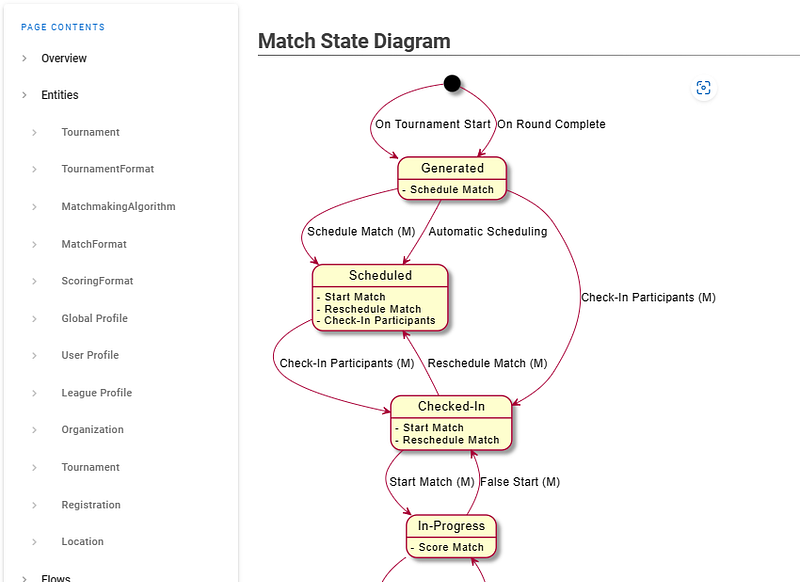
Occasionally, some specialized diagrams are required for context. For instance, if we're designing a system that has states, in a business sense, I may utilize PlantUML to form the diagram in the Wiki.
 Screenshot by the Author
This diagram helps define the structures later on in the design. It helps to define the actions of the users and to which state the object will transition.
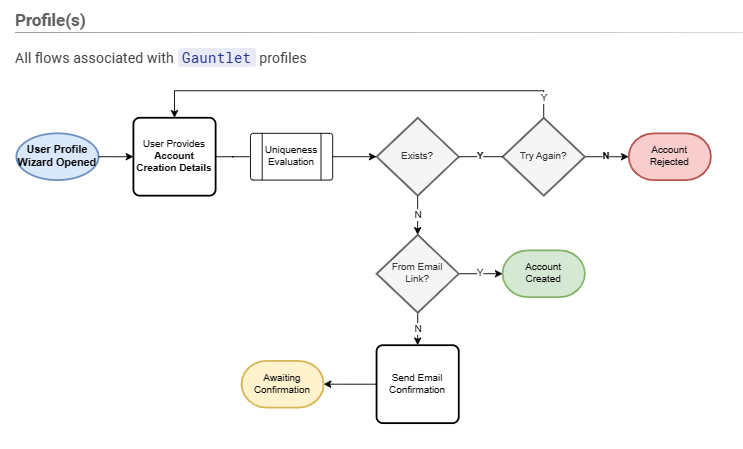
Another common diagram is to define logic flows from an interface standpoint. Here's an example:
 Screenshot by the author
This flow describes the business flow that is expected by an action from the user. I will color-code the elements to represent positive, negative, and neutral states.
Schemas (Wiki.js)
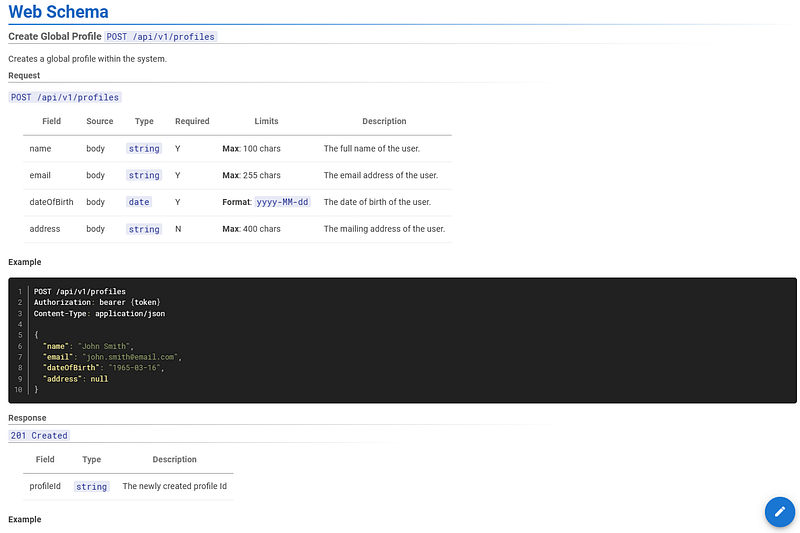
I will put web and data schemas within the wiki pages. They typically describe the fields and provide examples where necessary.
 Screenshot by the author
Here you can see some details in a typical schema endpoint. I include the endpoint, the fields, where they originate, and finally, a description. Then you will see examples and possible responses.
Although not shown here, I will put in place process flows for when this endpoint is called, much like the business flows above.
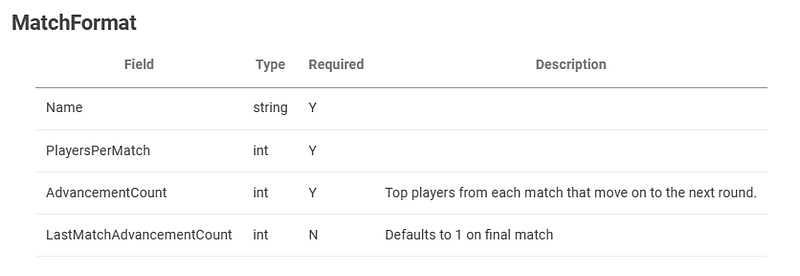
For data schemas, they look fairly similar.
 Screenshot by the author
There will not be examples typically with these. Instead, queries will usually ride alongside them.
Topologies (Wiki.js / Diagrams.Net)
Lastly, I draw system-level diagrams to describe how different aspects connect and talk together.
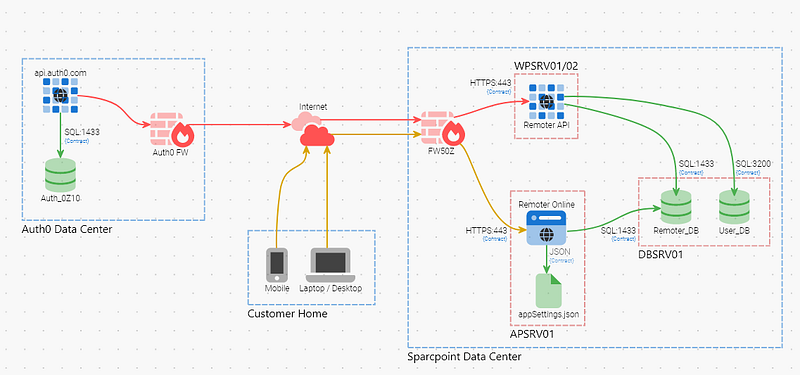 Screenshot by the Author
Without going into detail, you can see how different aspects of the system connect and what databases are utilized. It is meant to provide a high-level design of the system.
Each one of these types of documentation from a design perspective could have its own book. However, I hope the examples provide insight into some ideas that may help your design process.
Thank you for reading!