You can do a lot with very little
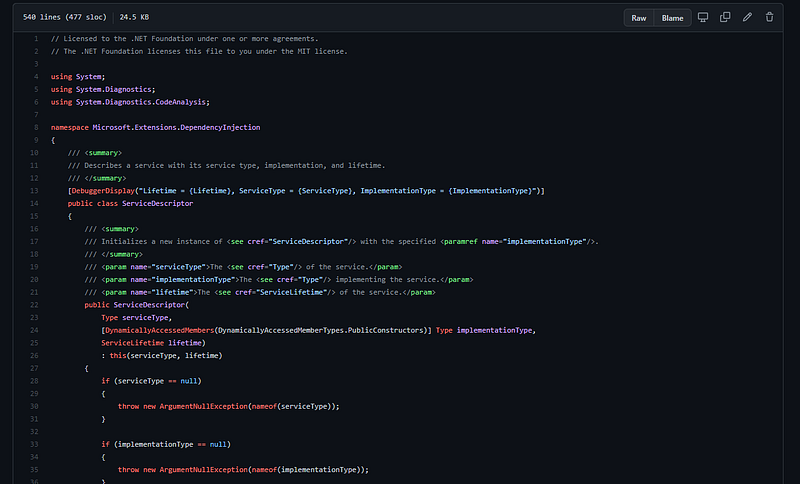
In a previous article, C# Simple Interfaces: Service, I talked about service interfaces that could be simplified and expanded through the use of extension methods. In a similar manner, this article is going to be a discussion on another simple style of interface that provides massive scalability, due to its simplicity: Container Interfaces.
Container Interface
A container interface is a holder of data. This "data" is then utilized in a manner by some service or process. In a lot of ways, container interfaces are a simple approximation to the builder pattern, without the huge mess of a complex method structure.
To reiterate from my last article,
Because an interface is a contract, keeping the contract as small as possible, tends to provide the most benefit. This is especially true if the interface holds all the necessary functionality you may need.
Basically, we want to minimize the surface area of an interface. This will make extending its capabilities much easier by making new implementations trivial to implement (we hope). Let's walk through an example.
IServiceCollection Interface
If you're familiar with .NET Core, you will have likely come across the IServiceCollection interface. This is a central focus of dependency injection within Microsoft's IoC Container model. Let's look at the interface definition.
So, let me walk you through this code line-by-line.
Line 11 => It's a list of ServiceDescriptor
Yea. That's it. For all the functionality that this interface provides to a core feature of .NET, it is simply a list of ServiceDescriptor. The fact that the interface is inherited is most likely a matter of convenience.
Note: Of course, to make this work, an underlying service must be created that will accept this collection of values. But that doesn't negate the simplicity of using this from a developer point-of-view.
Why does this work? Well, this works because the ServiceDescriptor class is a model that simply holds the descriptions of lifetime, contract, and implementation in a DTO-style object. Here is a slimmed down version of the ServiceDescriptor class.
This class requires a Lifetime property and a ServiceType property only. Past this, everything else is optional. To ensure that the state of the object is always maintained, the instances of this class are immutable and very specific constructors are utilized to allow for different allowable states. This is critical in this type of application, as having an ImplementationType and an ImplementationInstance would not make any sense.
The question now becomes, how does this make our lives easier? From a developer's point of view, I don't think it does, by itself. Instead, we should really introduce some syntactic sugar to ease our pain. Let's use extension methods!
Let's start by creating a set of extensions for basic DI container lifetimes, as supported by the ServiceLifetime enumeration.
I implemented these without appropriate null checks, but otherwise the implementations are the same. I also left out some of the overloads. You can always add these in, as you see fit (or you know… use the actual implementation).
Now if you have done any level of .NET Core dependency injection, you will notice that this is only the tip of the iceberg. The next sample code from the runtime is for configuring options.
You can see that we can continue to expand on this simple interface to create complex dependency injection frameworks, simply by adding a model class to a list. The beauty of this methodology is in its simplicity. Even better, is that if we decide to implement our own version of IServiceCollection or IServiceProvider (the built IoC Container) we can still re-use all of our application code. A nice example of this is the Lamar DI System where instead of ServiceCollection they call their container ServiceRegistry.
Of course, to utilize a different container typically means we want to utilize some additional functionality or syntactical sugar, so the code will most likely change. But we don't lose the extensions provided.
Another Short Example
We have all seen the IServiceCollection before in .NET Core. But what if we want to do something in our own system; maybe something a bit different.
Let's use a similar tactic but use it for an ASP.NET Core action workflow system.
Workflow Activity
The first step is that we want to perform some actions on the workflow, so we'll define the interfaces above. We have an IPage interface to define the result at the end of a workflow run. A IActivity can choose to alter the context object IActivityContext allowing us to alter the result, as necessary.
Finally, we have a collection of activity descriptors IActivityCollection, similar to IServiceCollection, where a Type can be provided or an instance of IActivity.
Page Descriptors
Next, we need to define the pages themselves with a PageDescriptor class. This class requires the PageType and the OnNext activity collection. Optionally, you can include a cancel action. In this case, we will determine based on the current state of the workflow, what happens when a user activates a "next" command (i.e. "Ok", "Save", "Export") or a "cancel" command (i.e. "Cancel", "Back"). This will have to be defined on the controller actions that activate the workflow. But it means that the pages themselves do not directly need to know the next stage, as this is determined at runtime.
We will assume that the first page added to the collection is the starting page. Then all pages after that are possible targets.
Building the Pages
Let's start by defining some extensions for creating activities.
Next, let's create a basic set of extensions for the page definitions.
You may notice a class I have not defined yet called ActivityCollection. Let's assume that this is an internal implementation of the IActivityCollection interface. However, the implementation is somewhat inconsequential to the discussion here.
Try it Out!
Now that we have a few extensions, let's add a few "unimplemented" extensions for us to show an example. We'll include a few "pages" that we may have as well. From here, you'll have to use your imagination!
And finally, let's show an example usage of our new extensions in a factory method.
You can see here that we can create a fairly complex workflow from a simple set of interfaces. In particular, most of the work is performed by the two container interfaces. This is the power of proper interface design and the simplicity it can bring.
Conclusion and Sign Off
In this article, I showed a real-world example created by the .NET Core Team and a workflow example. Both use a similar technique when building up the system, a Container Interface.
I will admit, though, that this technique may limit your designs. We may end up losing with respect to syntactical sugar. We have to work around our simplicity if we want to create the "perfect" syntax for our system. This will add complexity within the implementations and extensions. However, if appropriately encapsulated, the consuming developer will not know the difference.
If you have any thoughts or suggestions, please comment below. And be sure to follow me on medium, as I release new topics all the time!
Until next time!