We've all heard about the Builder Pattern by the Gang of Four in Design Patterns: Elements of Reusable Object-Oriented Software. This pattern is used to create complex objects with constituent parts that must be created in the same order or using a specific algorithm (Reference). This is considered a Creational Pattern.
The traditional approach to the Builder Pattern is to use an abstract class (or interface) to build some complex object. In turn a concrete implementation is created that may perform the building in different ways.
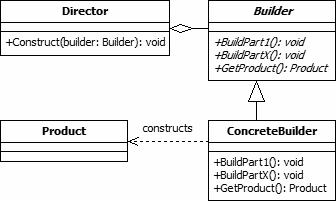 Builder Design Pattern (blackwasp.co.uk)
This approach is appropriate in a lot of scenarios. However, what I question, is where the actions should be located: On the interface itself, or can it be somewhere else?
The goal of this article is to provide different approaches to utilizing the Builder Pattern depending on the output of the builder. It is usually desired to have the smallest interfaces we can, as larger ones require more work to re-implement (a topic for another day).
Why We Need the Builder Pattern
If you work in .NET Core, then you probably use the builder pattern all the time. For instance, consider the following:
IServiceCollection
IConfigurationBuilder
Both of these examples show an approach to building up a complex object.
In the first, we're building up our dependency injections for the application. We're "building" these up to ease the need to manually create these dependencies. The approach here is to utilize a container service with extension methods to build up the object (C# Simple Interfaces: Containers).
In the second, we're building up our configuration hierarchy. We're taking multiple complex sources of configuration and creating a simple IConfiguration object for use in the application, avoiding the manual process of searching through each source ourselves. Here the approach is more traditional where a Build method is explicitly called.
At first glance, it may not appear that IServiceCollection is a builder. And honestly, the collection itself is not. However, how it is being used in the code above is a builder pattern, in a sense (but not in the strict definition discussed by the Gang of Four).
Each approach to building up our objects and systems is valid, but which approach we use depends on our output.
Let's talk through these two approaches.
Traditional Approach (Most Common)
Let's use an example that might be a bit more unique, for a builder. Let's say that we are prototyping an application, however, we're trying to save some time designing out a database and implementing a bunch of SQL Repositories. So, we decide to create quick and dirty In-Memory ones (In-Memory Repositories: A Forgotten Design Tool). The amount of time to create these repositories is much cheaper upfront, so it makes sense during prototyping.
However, we quickly run into a problem when we're debugging locally…
The data is cleared out every single time we stop the application.
One way to fix this is to create some initializers that will run, while we're in development, that will initialize our in-memory "database" at startup. This way, we have data we can test against.
Let's define a couple of interfaces that we will use. We will leave out the implementations because they're inconsequential here.
These are straight-forward enough. We left out the remaining CRUD operations, as we don't need them for the example.
Now, we want to build up our in-memory database from an initializer. First, we really should create a builder that we can utilize in our initializer.
In this particular case, we're doing something a little funny. We're outputting the built objects. You may be wondering why. The idea here is that we don't want to persist this data until we're ready (calling BuildAsync), but we will need the identifiers while we're building. This causes a conundrum.
Do we add everything to the database right away and store the identifiers? Or do we track objects and their dependencies within the builder? Or do we handle this manually?
There isn't a right answer, generally speaking. However, in my case, there are a few things we know.
- We're using an In-Memory database, but we may want to reuse this builder for SQL Server at some point.
- We are making an assumption that the entities will be mutated, and the identifiers will be set upon insertion (like EF does). This is an undocumented contract we're making with our code and all implementations must adhere to it (Better have some tests to ensure this).
- This is for development purposes right now, so we want to make it easy and limit the amount of time it takes to initialize our data. We need to limit the amount of work we're doing for this, otherwise we may waste precious development cycles.
For these reasons, I'm choosing to output the object to be used in multiple stages.
Now let's define a simple initializer interface.
Nothing complicated here. We'll simply do the following in our Program.cs to ensure that we run the initialization,
The next piece of the pie is the implementation of the builder itself,
You'll notice that the build step is pushing everything into the provided repositories. Remember, we're assuming that these repos are holding to the contract and setting the identifier on each entity.
Afterwards, we clear out the lists. You'll see why in a bit.
The last thing to do is to create our DevelopmentTestingInitializer. This is where we're going to use our builder.
As you can see here, I'm calling BuildAsync on the builder multiple times. This is to save on creating the builder each time. In this case, it isn't expensive so we could have created it 3 times safely. This was more for example's sake.
After each build, we make the assumption that the Id is populated. This allows us to pass the items onto the next stage of the process. At the last portion of the method, though, we ignore the outputs. We don't need the inventory records, so we discard them.
Now it should be noted that this is strictly an example. There are a number of things wrong here, but I did it this way for brevity. For instance, we really shouldn't inject the builder into a class this way. Instead, it should be either a Builder Factory of some sort, or it could be that we forget the builder interface altogether and just
newthe concrete builder class up directly in the initializer class. The purpose of the example is to show building a complex system, which I believe I provided.
Summary of Example
In this example, we went through a more traditional approach. This approach is most common when we have complex topics we must build. This wasn't an example where we're building up a single container of a single type. Instead, it requires multiple steps, put in order, with a build step at the end.
We should utilize this approach when we know the complexity of the topic is beyond a simple list. However, if we can utilize a list-approach (next section) we should make every attempt to do so.
Container Approach (Less Common)
A container, as defined in this article, is simply a list, or collection, of items. Depending on the complexity of the container, we may or may not need a set of builder methods.
Remember, IServiceCollection is a simple container. But there are hundreds of extensions in the .NET Core ecosystem that build this collection up for the use of dependency injection. What makes this approach powerful is the simplicity of the interface and implementation the container, while providing an endless ability to extend without altering the interface.
Whenever possible, we should attempt to use this approach, because the contract is simple, and the extendibility of our builder is virtually boundless.
Let's use an example I haven't presented before in my articles.
I want to build a dynamic data field set that can be used in a custom workflow system. We have a number of different data fields we may care about:
- Comments: Input allowing users to allow comments
- Dates and Times: Input(s) allowing users to insert dates, times, or date/times
- Text: Input that allows users to insert plain text
- Uri: Input that allows users to insert links, that are validated
- Enumeration Selection: Input that allows users to select from an enumerated list
I won't use all of these in the example. Just providing a list for understanding the problem.
Each of these fields will inform a UI that is dynamically generated based on a collection of IDataFieldDefinition. We won't talk through the implementation of these individual field types, as it is beyond the scope of this article, but I'll show the interface to provide a basic understanding.
Now, we need to go ahead and create our container, which will hold an ordered list of data fields to be rendered to a screen.
How we go about using this collection is a matter of detail. Again, beyond the scope of the article, but I'd hate to leave you completely in the dark. So, for now, I'll leave you with this tidbit.
Once we build up a collection, we will create our render context and render the collection according to whatever algorithm we put in place. We could create a JsonPageRenderer or a RazorPageRenderer or a CommandLineRenderer. It could theoretically be anything. You just have to use your I-MAG-I-NATION.
Now that we have the end result, we need to build some items. We COULD do it this way,
But doesn't this feel a bit cumbersome to you? Technically, we're building up the collection, but man does it feel verbose.
Let's create some extension methods to help us out.
Then to use these extensions we can do the following,
Now this makes more intuitive sense. And it's easier to read. I think I prefer this over the last way of approaching a container build scenario.
Summary of Example
This approach works best for containers. Although you can use extensions on the traditional approach, and honestly, it's encouraged, it's not as common. However, don't neglect what can be built with the builder pattern. The reason, we use this approach for containers is because it makes the life of the developer much easier. It takes a bit of up-front work, but in the end, I feel it's worth the effort.
Conclusion and Sign-Off
The builder pattern is a huge part of our shared history. As developers, we've seen it for 30+ years. However, it still brings a lot of value, when used correctly. If you're using a builder concretely, then we may not care too much about interface design or extension methods. Otherwise, I highly encourage the use of extensions in this type of scenario.
Extension methods don't make sense with direct concrete builder usage. However, extension methods on abstract builders, or collections, has huge advantages. For instance, if you build 10 different implementations for a single collection or builder interface, those extension methods will work with ALL of them, auto-magically. This is the primary reason I love the idea of extension methods.
Some may argue that it's not TRUE OOP, but you know what, I'm not sure that I care. It saves time, makes me efficient, and allows me to extend functionality with ease. Whenever we put together an interface for a builder, we should aim to keep the number of methods and properties to a minimum so that we get the full impact of our extension methods.
I promise, you won't be disappointed.
Use the builder pattern properly, and pick the right approach, and you can't go wrong. But with anything, use in moderation. Overuse can hurt a codebase just as much as underuse.
If you liked this article, follow me here on medium. It encourages me to continue writing!
With great power comes great single responsibility principles!