 Code Snippet
In this article, I'm going to walk through a set of techniques for bulk uploading data. From a performance standpoint, database integration can be a significant bottleneck. This bottleneck can come from network latency, write processing time, and inefficient roundtrips.
To alleviate these issues we want to optimize our service method to only have 1 roundtrip from server to database.
To accomplish this goal, we will cover the following techniques:
- Correlating multiple collection models for processing within SQL Server
- Transforming lists of data into custom parameters using Dapper
- Utilizing SQL Server's MERGE statement to keep data appropriately joined
Let's jump in.
Data Model
Let's first start with our data model. We're attempting to bulk insert products into an inventory system. These products can have any number of associated categories and attributes (key-value pairs). We desire to upload many of them all at once without having to hit the database multiple times.
Note: A good portion of this code was pared down for brevity's sake. The production version contains more checks and balances than shown above.
The class hierarchy can be somewhat glossed over. But the reason there is inheritance is due to the nature of the system. We're utilizing a similar definition/instance model across all primary types. This won't be discussed here, so the class Definition has purposefully been excluded.
The following code is meant to give you a more logical model of the data, rather than what is done in production. This is included for ease of readability.
Next let's look at the SQL Tables that store this information
Again, we've ignored some tables referenced here on purpose, as they won't be relevant to the remainder of the code.
As you can see, we have 3 primary tables. 2 of these tables have foreign key references back to the primary Products table. The C# data model also supports this with the core ProductInstance, CategoryCollection, and CustomAttributes classes.
This model was created to be generic on purpose, providing a flexible approach to storing products and their details. Since products can contain so many types of information, we utilize this dynamic structure to allow for specific parameters depending on the application.
Correlating Collection Models
Goal: To reiterate, we want to bulk upload multiple products, which in turn can have multiple categories and multiple attributes.
In order to accomplish the goal, we need to first have a way to upload this data in one call to SQL Server. We can accomplish this using User-defined Table Types. UDTT are custom types in SQL Server that will allow us to take a DataTable and upload to a specific table structure for T-SQL processing. In our current scenario, we're going to need 3 table types, one for each collection: Products, Custom Attributes, and Categories.
We should keep in mind that these are new instances of products that we're uploading, meaning we do not yet have identifiers. So how can we correlate the data in the 3 collections? We're going to have to index our data. We should take this into account in our design.
The following are the UDTT we will be using.
We have an index in each table type that corresponds to the index in the product list. Although the product list will have a unique index in each row, the integer list (Categories) and the custom attributes list may have more than one row with the same index.
We can make our lives easier if we create C# models that follow these SQL models.
By having this model, we can now work to turn these models into appropriate custom parameters for our SQL Query Statement.
Transforming Collection Data to SQL UDTT
In order to utilize the UDTTs that we created previously, we must use the DataTable type. I will also be utilizing the Dapper library when creating converting this data. Dapper has an interface called ICustomQueryParameter for this purpose.
We're doing the following in each of these methods:
- Creating a
DataTablewith the same name as the UDTT (although I do not believe this is strictly necessary) - Setting up the
DataColumnfor each property of the model - Adding the rows from the list to the
DataTable - Converting the
DataTableto aICustomQueryParameterusing Dapper'sAsTableValuedParametermethod.
These functions will now make bulk uploading much easier.
SQL Server's Merge Statement
There aren't a lot of ways to easily bulk insert records and return the created identifiers within SQL Server. However, Microsoft has provided, in their flavor of SQL, the Merge statement.
MERGE (Transact-SQL): Runs insert, update, or delete operations on a target table from the results of a join with a source table.
Let's look at how we're going to utilize this statement.
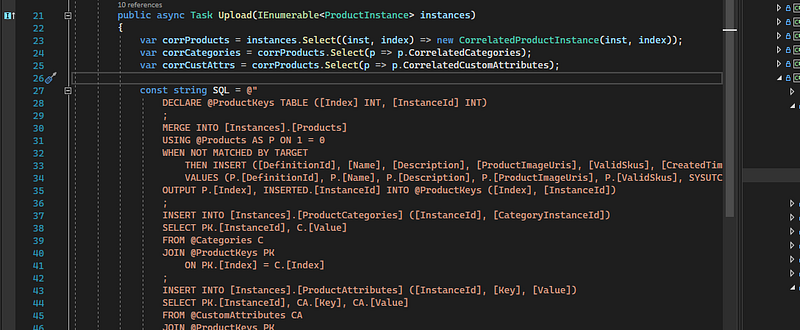
Let's break down this statement a little bit.
- We create a local table variable
@ProductKeysthat will hold our index and newly minted identifier - We will
MERGErecords from our primary[Instances].[Products]table and the uploaded parameter@Products(which is our product collection). We use the condition1 = 0to ensure that it will never be matched by the target and force our use of theINSERTstatement. - We perform the insert with the
WHEN NOT MATCHED BY TARGETclause followed by the insert statement itself. - Finally we
OUTPUTthe[Index]and new[InstanceId]into the@ProductKeystable we setup.
At this point, we will have all the details we need to insert the other records using standard joins.
Putting it all together
Finally let's put all these techniques together to form a bulk upload class.
I wrote previously about the
ISqlExecutor. Refer to that article here.
Here's what is happening,
- We utilize our correlation classes to convert our
ProductInstancecollection using Linq. - Next we setup our SQL statement with the
MERGEstatement. - We utilize basic
INSERTstatements on the category and attribute table where we join on the@ProductKeystable providing the appropriate identifiers. - Finally we run the SQL Statement by converting the collections of data into the
ICustomQueryParametermethods we created previously.
Conclusion
This methodology of bulk uploading data has a good number of positive effects on performance (data to be provided in a separate article). We avoid multiple round-trips to the database server. We optimize the query to only require 3 statements, instead of multiple individual insert statements. We optimized the use of set-theory calls and avoided any while loops or if statements (which is one way to approach the problem I guess…). We have generated a set of techniques to create a highly performant process for future needs.
Admittedly, it does take a larger cognitive load to process what is happening in this code. And the need for more table types adds some complexity. But the performance gains of this approach are apparent, and in some higher intensity loads, will save developers a lot of heartache when troubleshooting why their systems are "slow." So even though we have to do some more complex code setup, the return on investment (ROI) is high enough (in my opinion) to warrant the additional complexity.
Hope this has helped provide some techniques to better upload data to your database system. Til next time!