We should really be considering how we are isolating code within assemblies as we build our software.

I want to walk through an example of a system we might want to build for centralizing email delivery from Azure Cloud. It will allow any number of product teams within an organization to utilize the same mechanisms for sending emails. This allows wonderful reuse of code, simplifies the product developer's cognitive load when dealing with emails, and starts the advent of a platform for the organization.
Requirements
Here are the basic requirements:
- The System must be accessible as a RESTful API.
- The System must be hosted within Azure Cloud.
- The System must allow for rendering email bodies from stored templates (whether in the cloud or locally).
- The System must allow for rendering HTML and PDF attachments from stored templates (whether in the cloud or locally).
- Generated Attachments must be stored within Azure Cloud for audit purposes.
- The System should provide a client API for product developers to use without requiring direct knowledge of the RESTful API.
This list of requirements is very short and neglects the detail to write the actual code. However, the goal isn't to actually show you the code itself, but rather how to organize it based on these needs.
First Pass Design
As a first pass in writing this code, you create three new projects:
Platform.Email.Core: Contains all the abstractions, models, services required to satisfy the requirements.Platform.Email.Client: Defines the client API for product developers to use when accessing the cloud services.Platform.Email.FunctionApp: Holds all code related to the Azure Function App and the RESTful API.
The structure of the folders within these assemblies might look like the following,
.
├── Platform.Email.Core/
│ ├── Abstractions
│ ├── Extensions
│ ├── Models
│ └── Services/
│ ├── Storage
│ ├── Template
│ └── Email
├── Platform.Email.Client/
│ └── Services
└── Platform.Email.FunctionApp/
├── EmailFunctions
└── TemplateFunctions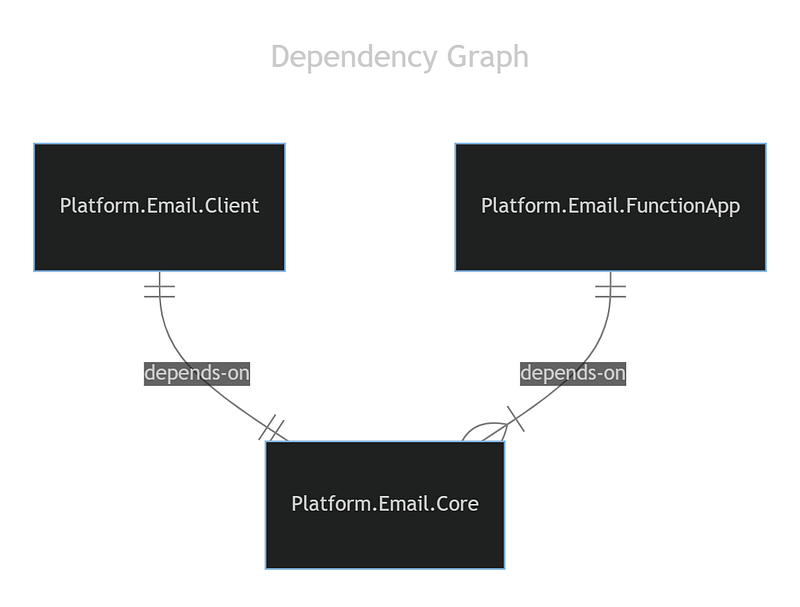 Dependency Graph
At first glance, this might not look harmful. And to some degree it isn't. You can satisfy the requirements defining your structure this way. And maybe, for you, that is good enough. In fact, it can be good enough, if you know that nothing about the system will change in the future.
However, if you've been a developer longer than about 3 months (professionally) you should know that requirements of this system will change.
For instance, initially, we are going to offer two main types of storage:
LocalFileStorage: Allows for templates to be stored locally and used from the product application directly.AzureBlobFileStorage: Allows for templates to be stored in the cloud (Azure Blob Storage) and used locally to the FunctionApp environment. It will also be used for storing rendered attachments.
In conjunction these classes should allow us to pull templates from Azure or the local filesystem. It will also allow us to store generated attachments within Azure using the AzureBlobFileStorage.
But we know that things can and do change. What would happen if the business decided they want to pull files from an FTP site? Or maybe we're integrating with a customer, and they utilize AWS? What if we want to store generated attachments outside of blob storage?
We would have to alter, most likely, all three of the assemblies. We'd have to alter the Core assembly because that is where the new FTP and AWS classes will live. The Client will need a version update since the models will most likely change within the Core. And naturally, the FunctionApp uses the new classes as well. This isn't ideal…
Here is why I'm not a fan of this,
- Adding a new technology requires all the libraries to be re-deployed since the
Corelibrary was updated, with a version update. - Every client will NOW need to bring along ALL dependencies of
Coreincluding any libraries used to access Azure, FTP, AWS, etc. This can become hundreds of dependencies over time. - The templating functionality itself is extremely useful outside of email, however, we cannot utilize it without getting all of email dependencies with it.
We're not really letting our product developers choose what they need. It may be that one team only needs Local and FTP, while a different team requires Azure and AWS only. It could be that a team only wants to utilize the Template system we put together.
Regardless, we need to think about how we break these pieces up better.
A Better Solution
Let's make an assumption and say that we are CERTAIN that someone will eventually need to use a different templating engine and different storage mechanism for templates and attachments.
BTW, I am not a fan of the YAGNI mantra. To more junior developers it implies that we shouldn't design for change because we "aren't gonna need it." Of course, more senior developers understand this isn't the case. Build for the change, just don't implement the change until it is needed.
So here is what I propose,
.
├── Platform.Email.Abstractions/
│ ├── Services
│ ├── Extensions
│ └── Models
├── Platform.Extensions.Email.SMTP/
│ ├── Extensions
│ └── Services
├── Platform.Template.Abstractions/
│ ├── Services
│ ├── Extensions
│ └── Models
├── Platform.Extensions.Template.Scriban/
│ ├── Extensions
│ └── Services
├── Platform.Storage.Abstractions/
│ ├── Services
│ ├── Extensions
│ └── Models
├── Platform.Extensions.Storage.LocalFileSystem/
│ ├── Extensions
│ └── Services
├── Platform.Extensions.Storage.AzureBlobStorage/
│ ├── Extensions
│ └── Services
├── Platform.Email.Client/
│ └── Services
├── Platform.Template.Client/
│ └── Services
└── Platform.FunctionApp/
├── EmailFunctions
└── TemplateFunctions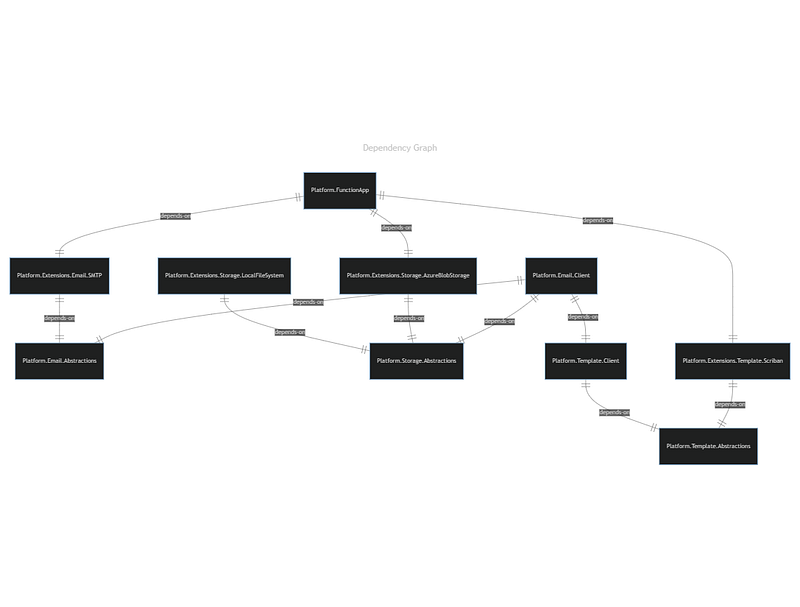 Dependency Graph
So, we just went from 3 assemblies to 10 assemblies. Yikes! And look at all those lines?! This looks way more complicated!
Well yes, it "looks" more complicated. And really, you'd be right. It is when building it the first time. But if you have read Clean Architecture by Uncle Bob, then you might understand what we're trying to accomplish here. Let me see if I can explain it,
Layer 1 — Abstraction Assemblies
We have all of our stable dependencies at the bottom. Those are assemblies like Platform.Email.Abstractions, Platform.Storage.Abstractions, and Platform.Template.Abstractions. If you design the contracts well upfront, these assemblies will never change.
Layer 2 — Implementation Assemblies
We need to create concrete implementations of our abstractions. This includes Platform.Extensions.Email.SMTP, Platform.Extensions.Storage.LocalFileSystem, Platform.Extensions.Storage.AzureBlobStorage, and Platform.Extensions.Template.Scriban.
These are less stable. This is because, as patches occur within their respective platforms and engines, we will have to patch ours as well. So, we want to make sure that we have less dependencies on these, when possible. This is a key reason why this separation is beneficial.
In the first design, we would have to update the Core library every time Azure or AWS updates their design. Here, we would only have to update a single library and the subsequent dependencies. Those that chose NOT to use those libraries, don't need to worry about it.
Layer 3 — Web Service / API
Here in lies the core functionality of the System within Platform.FunctionApp. I renamed this assembly because I really do want to optimize my usage of Azure, so I want to keep Template and Email services together. However, the name didn't work well with the template service included. In contrast, you could separate these out into two services, if you're willing, and that would be even better.
This layer is unstable, by nature. There are more reasons for this to change than any other. We may want to move storage somewhere else. There may be bugs with respect to your threading model and concurrency. I suspect most of your effort will be in this library when requirements change.
But again, it CAN be limited depending on the types of change. For instance, if you are simply changing to a new technology for storage, you are really only changing the dependency root of this assembly. This is trivial. You'll build the new extension assembly, reference it, change the dependency root, and deploy. This could be done within a few hours. Nice!
Layer 4 — Client Assemblies
Last on the list are our client assemblies, Platform.Email.Client and Platform.Template.Client. These libraries are NOT shown in the diagram as being dependent on Platform.FunctionApp because they do not take a reference to it. However, in reality, it is a dependency of these clients.
If the schema of the endpoint's changes in any way, the client has to be updated. This is inherent to the idea of a client. If you build a flexible API, upfront, this should not occur often. Even so, the stability of these libraries isn't directly tied to the function app's stability. There is only that one primary reason for change: A contract change.
Design Conclusion
As you can see, we have created more assemblies. However, we have also created smaller assemblies with very purposeful responsibilities. Each of them has a Single Responsibility that they need to focus on. And with that, change can be controlled and isolated when other teams have a need to use them.
Rule of Thumb
Here are some guidelines regarding assembly breakout that you might find useful,
- Interfaces, contracts, and their associated models, should be placed in a stable
Abstractionsassembly to be shared. - Messaging schemas should generally be placed in a stable
Schemaassembly to be shared. This is for use-cases like defining messages for queues, message buses, and data definitions (like Azure Table Storage) that is shared between assemblies. Note, sometimes I do put Web API schemas in a separateSchemaassembly to be shared withClientassemblies. Why create those models twice?! - Assemblies should be created, and named, according to the technology being utilized. (Examples:
Platform.Inventory.SqlServervsPlatform.Inventory.MySql) - For any classes interacting with external services, not via in-process methods, should be grouped into
Clientlibraries. - For top-level assemblies / executables, I prefer they be named based on their target type. (
FunctionApp: Azure Function App Assembly,Web: Web Application,WebApi: Web Service Only,WPF: WPF Desktop Application, etc.)
Conclusion
It is usually easier to just throw everything into one big assembly. However, the separation we created provides a flexible architecture for the future as requirements change. The decisions I made was based on "potential" changes that I could envision occurring in the future. I had to think about what COULD change and design for those scenarios. For instance, the following are changes I thought about,
- The business may decide to change where attachments are stored based on cost.
- The technical group may decide that Scriban isn't the most performant engine we should be using and may implement another.
- The business may decide to have non-developers help design templates and the Scriban syntax isn't ideal. So, a different one is chosen and implemented.
- The business may decide they want to stop hosting an SMTP server and instead use an external service like Mailgun's API to send emails (most likely due to performance issues).
- The business likes the templating engine so much that they want to use it to generate PDF receipts on the main website. However, they do not need the email portion of the system.
By imagining what could happen, we can create a flexible system, opening up opportunities for the business, and the technical team, to evolve their code base without the large risk of changing spaghetti-coded assemblies.
The best code is the code that never has to change.
If you can design a system where you only add assemblies and add code to assemblies, rather than changing already written code, you've perfected architectural design.
Hope this has given you some food for thought! Until next time!